
Inbox starters 📬✨
What is an inbox starter?
An inbox starter is the menu / FAQ screen that appears the moment someone opens your Instagram DM.
Without typing anything at all, a visitor can see at a glance what they can do. 🚀
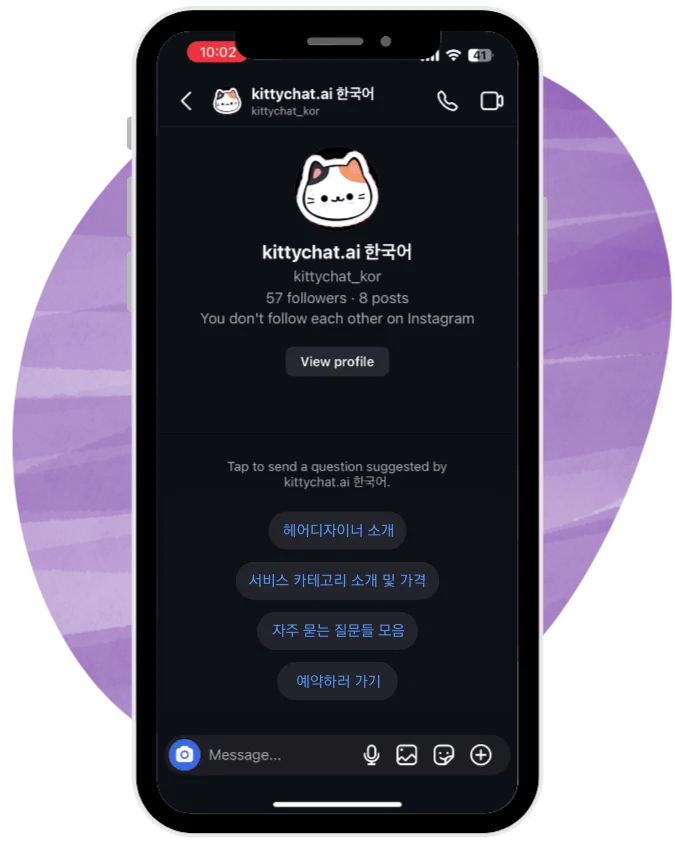
What you can show 🧭
An inbox starter screen can hold up to 4 items. Each item can be set up as:
- ❓ A question in FAQ form
- 🔘 A menu buttonFor example: See the menu, Pricing, Book now
It turns your DM inbox into a tidier, menu-style structure.
What happens when a button is tapped? 👆
When a visitor taps a button on the inbox starter, one of the following is sent automatically:
- 📝 A text message
- 🃏 A button template card
About button template cards 🃏
When you use button template cards:
- Up to 3 buttons per card
- Up to 10 cards, arranged as a carousel
They work well for:
- 🍽️ Restaurant menus
- 🛎️ Service categories
- 🛍️ Product lists
A carousel lets you present a lot of information neatly.
Follower-only content 🔒
When you use button template cards, you can control who sees the content, based on whether they follow you:
- ✅ A follower→ The content opens straight after they tap the button.
- 🚫 Not a follower→ They are asked to follow before they can see it.
Useful when you are offering coupons, events or limited information to followers only.
What happens after a menu item is tapped ℹ️
- Once a visitor taps a button, the inbox starter menu disappears automatically.
- This keeps the screen clear, so they can focus on the conversation that follows.
The menu can always be brought back ☰
Even after the menu has gone, a visitor can:
- Tap the ☰ (three-line icon) at the top right of the DM screen
- Open the persistent menu again at any time
So they can move around the menu freely, even mid-conversation.