
Set Up Auto-DM on Influencer Collaborator Posts
Hey there! If you’ve run Instagram marketing for any length of time, you’ve probably hit this exact wall:
“The influencer's reach was amazing, but almost none of it actually landed on our brand account...”
“We're drowning in comments on the influencer's post, and manually DM-ing our link to every single one is breaking our fingers.”
If that sounds familiar, this one's for you. Today we're covering the most reliable way to combine an influencer's reach with your brand's auto-DM system — sending automatic DMs from your own brand account, without ever touching the influencer's account settings.
💡 The short answer: is this combo technically possible?
Yes — 100% possible, and it's currently one of the most effective, trending setups out there. The structure is refreshingly simple.
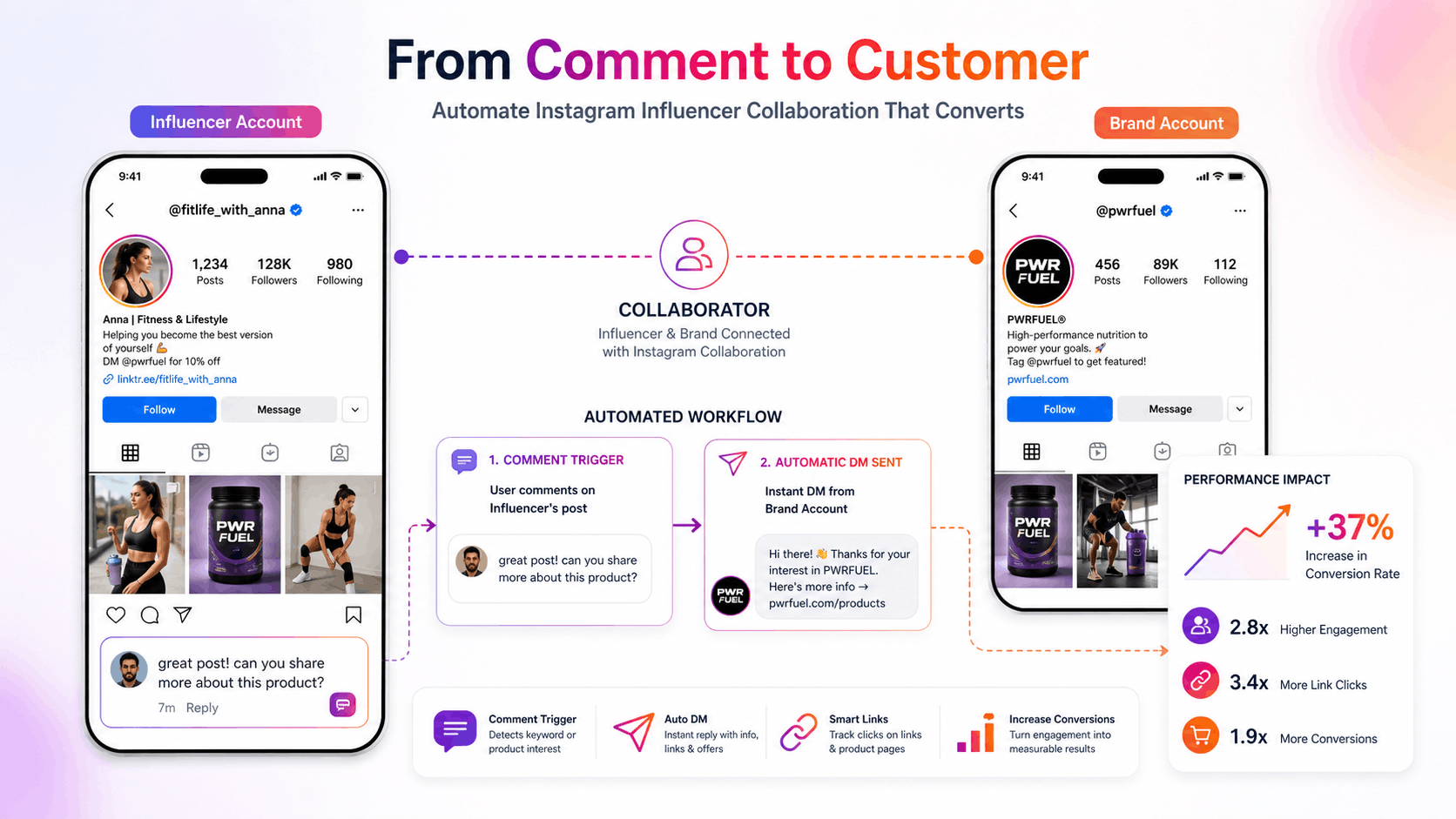
Post from your brand account, tag the influencer as a Collaborator, and set up auto-DM on the brand account.
Do that, and when the influencer's followers comment on the post, your brand account automatically fires off a DM with the link or offer — no manual work required.
🛠️ How it actually works (and why it's possible)
This works so smoothly because of a specific quirk of Instagram's Collaborator feature.
One post, two feeds
A collaborator post shows up identically in both the influencer's feed and the brand's feed — and crucially, the comment section is merged into one.
The trigger fires
When the influencer's followers comment on the post from their side (say, "info" or "link"), your brand account's auto-DM tool detects it in real time through that shared comment thread.
The DM goes out under your brand's name
Since the auto-DM tool is connected to your brand account, the very first DM conversation with each commenter naturally opens under your brand's name.
🎯 3 reasons this setup wins
① Maximizes conversion to your brand's followers
The conversation doesn't end on the influencer's account — the customer receives a DM directly from your brand. That naturally carries the conversation over to your own channel, making it far easier to drive follows and purchases.
② A clean collaboration process (zero hassle for the influencer)
You never have to ask the influencer for anything awkward, like "please give our auto-DM tool account access" or "can you set this up on your end." From their side, it's exactly like any other collaboration — just tap "Accept collaborator invite," and that's it.
③ Clean, centralized data tracking
Response rates, link click-throughs, and conversions are all visible and trackable in one place, right inside your brand account's DM system.
⚠️ 3 things to check before you launch
Even the best setup can go sideways on the details. Check these three before you go live!
- [Required] The post must originate from the brand account: The brand account needs to create the post and invite the influencer as a collaborator — not the other way around. If the influencer posts first and invites the brand, auto-DM often fails to trigger correctly.
- Coordinate the posting time in advance: The influencer needs to accept the collaborator invite quickly after the brand posts, to get the full reach boost. Line up the exact posting window with them ahead of time.
- Always test on a secondary account first: Depending on your auto-DM tool and Instagram's current API policies, small quirks can pop up. Before running this for a real campaign, register a brand test account as a collaborator, post a test feed, comment on it yourself, and confirm the DM actually arrives.