Header #3
Operate your service business smarter.
Insta marketing + automation tools for
Service businesses
인스타그램 마케팅
+ 자동화 도구

An Instagram Auto-DM service that automates promotions, events, and customer support—helping you save time and increase customer visits.

Header #3
Promote to Your Customers’ Friends
Offer Coupons When
Tagged in Stories

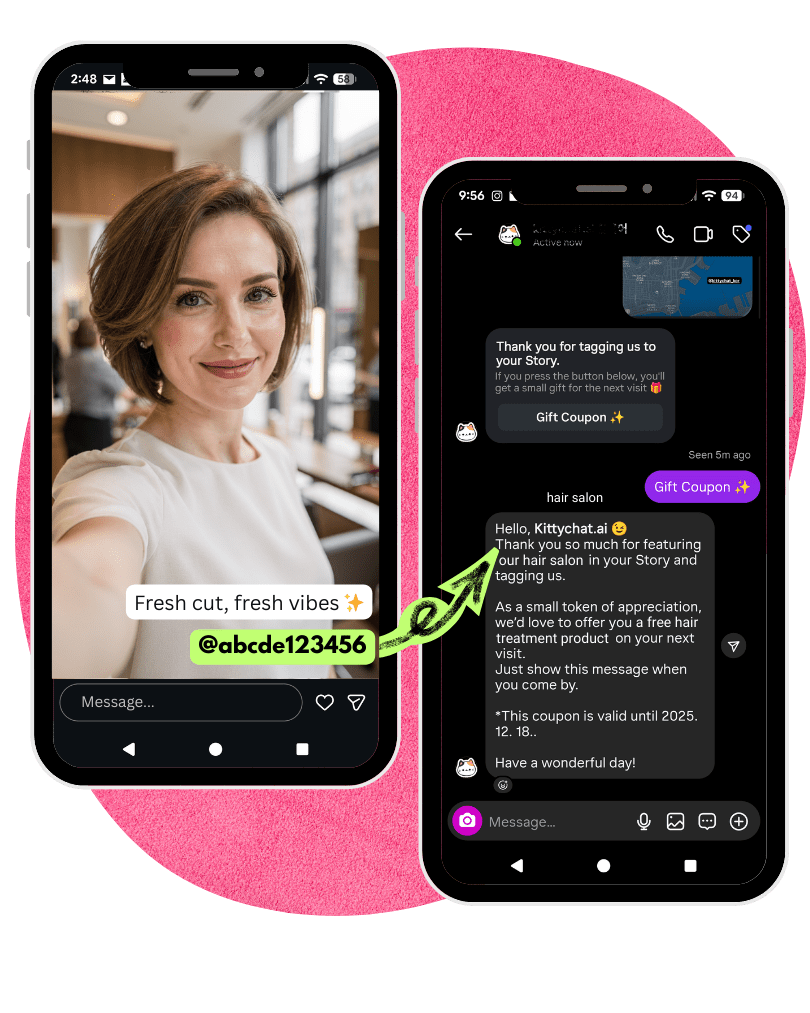
When customers feature your store in their Instagram Stories and tag your account, an automatic DM is sent to them.

▪️ Encourage customers to post Stories sharing their experience at your store

▪️ When your account is tagged, an auto DM is sent—allowing you to reward them with a surprise bag, an extra service, or a discount

▪️ You can also set a coupon expiration period based on the time the customer clicks the button in the DM (e.g., next day, 2 weeks, etc.)
Header #3
Promote to Your Customers' Friends
Offer Coupons When
Tagged in Stories

When customers feature your store in their Instagram Stories and tag your account, an automatic DM is sent to them.

▪️ Encourage customers to post Stories sharing their experience at your store

▪️ When your account is tagged, an auto DM is sent—allowing you to reward them with a surprise bag, an extra service, or a discount

▪️ You can also set a coupon expiration period based on the time the customer clicks the button in the DM (e.g., next day, 2 weeks, etc.)

Header #3
Increase conversion rate
Spread Your Post
Further

A commonly used automation like:
“Comment ___ and we’ll send you a DM right away.”

▪️ By using auto comment replies, you can increase your post’s reach
(higher engagement → Instagram recognizes it as a quality post → greater reach)

▪️ You can require users to follow your account to join an event, check their follower status, and show the final message (coupon) only to followers

▪️ Even offline, try offering small gifts to customers and ask them to comment on and share the post you’re promoting

Header #3
Increase conversion rate
Spread Your Post
Further

A commonly used automation like:
“Comment ___ and we’ll send you a DM right away.”

▪️ By using auto comment replies, you can increase your post’s reach
(higher engagement → Instagram recognizes it as a quality post → greater reach)

▪️ You can require users to follow your account to join an event, check their follower status, and show the final message (coupon) only to followers

▪️ Even offline, try offering small gifts to customers and ask them to comment on and share the post you’re promoting

Header #3
Handle Customer Inquiries
AI Answers Customer Questions
Using Your Data

OpenAI’s AI, trained on your own data, can respond to customer questions on your behalf.

▪️ You can prepare the data by scanning your website, uploading files, or entering information manually.

▪️ After the conversation between the AI and the customer ends, you’ll receive the full chat transcript by email.

▪️ You can review the conversation through the email, then open Instagram DM to continue the chat personally if needed.

▪️ The AI chatbot can be placed in your restaurant via QR code, and also installed on your website as a bottom-right chat widget.

🎈 If you’d like to try the demo, click the round cat button at the bottom-right and ask any question through the Instagram DM that appears.

Header #3
Handle Customer Inquiries
AI Answers Customer Questions
Using Your Data

OpenAI’s AI, trained on your own data, can respond to customer questions on your behalf.

▪️ You can prepare the data by scanning your website, uploading files, or entering information manually.

▪️ After the conversation between the AI and the customer ends, you’ll receive the full chat transcript by email.

▪️ You can review the conversation through the email, then open Instagram DM to continue the chat personally if needed.

▪️ The AI chatbot can be placed in your restaurant via QR code, and also installed on your website as a bottom-right chat widget.

🎈 If you’d like to try the demo, click the round cat button at the bottom-right and ask any question through the Instagram DM that appears.

Header #3
DM First Screen
DM
Welcome Menu

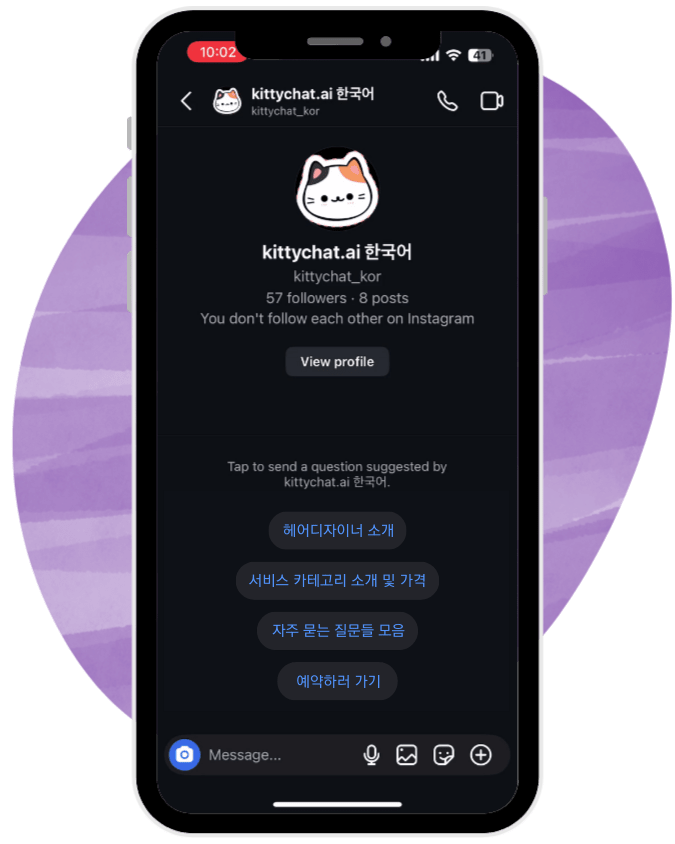
Buttons displayed when someone opens a conversation via DM from your profile.

1. You can display frequently asked questions and their answers.

2. You can provide clickable website links.

3. You can load up to 10 cards in a carousel format.

▪️ Up to 4 buttons can be added.

▪️ Once a user selects a button or sends a message, these options will no longer be visible.

▪️ Instead, you can use the DM Menu feature to place a menu icon in the top-right corner of the DM screen, allowing users to access these menu options again when clicked.
Header #3
DM First Screen
DM
Welcome Menu

Buttons displayed when someone opens a conversation via DM from your profile.

1. You can display frequently asked questions and their answers.

2. You can provide clickable website links.

3. You can load up to 10 cards in a carousel format.

▪️ Up to 4 buttons can be added.

▪️ Once a user selects a button or sends a message, these options will no longer be visible.

▪️ Instead, you can use the DM Menu feature to place a menu icon in the top-right corner of the DM screen, allowing users to access these menu options again when clicked.

Header #3
Persistent Menu
A menu that can be accessed
at any time within the DM.

Frequently used questions and links can be added as menu items.

▪️ Unlike the DM FAQ, which is only visible on the first screen before a conversation starts, the DM menu can be accessed by tapping the ☰ icon in the top-right corner of the DM screen.

▪️ Up to 5 items can be added to the menu.

▪️ When a menu item is selected, you can display a text message, or expand it using a button template with up to 3 additional buttons.

▪️ You can also load up to 10 button template cards using a carousel.

🎉 To try the demo, tap the round cat button in the bottom-right corner and, in the Instagram DM that opens, tap the menu icon in the top-right corner.

Header #3
Persistent Menu
Offer Coupons When
Tagged in Stories

Frequently used questions and links can be added as menu items.

▪️ Unlike the DM FAQ, which is only visible on the first screen before a conversation starts, the DM menu can be accessed by tapping the ☰ icon in the top-right corner of the DM screen.

▪️ Up to 5 items can be added to the menu.

▪️ When a menu item is selected, you can display a text message, or expand it using a button template with up to 3 additional buttons.

▪️ You can also load up to 10 button template cards using a carousel.

🎉 To try the demo, tap the round cat button in the bottom-right corner and, in the Instagram DM that opens, tap the menu icon in the top-right corner.

Header #3
Encourage Immediate Action
Sending
Bulk DMs

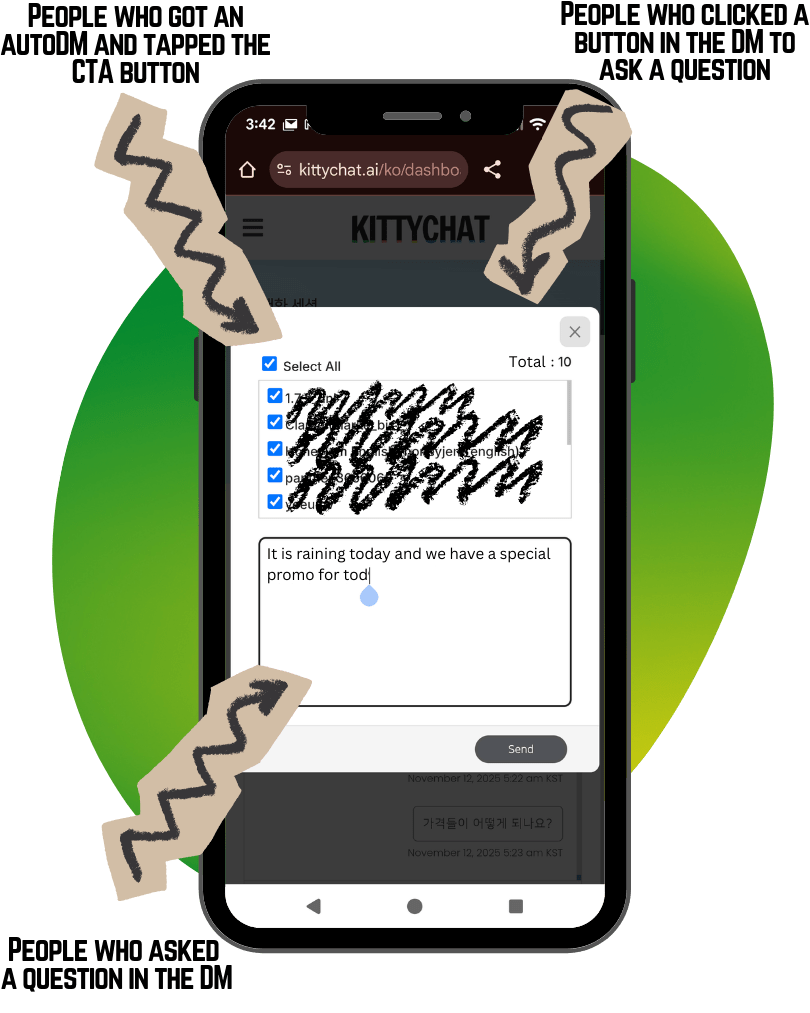
You can send a bulk DM to people who interacted with you in your DM inbox through the features above within the last 24 hours.

This includes clicking a CTA in an AutoDM, selecting a menu item from the welcome menu or persistent menu, or asking a question (to either a human or the AI).

▪️It doesn’t feel like a mass email — it looks like a personal DM.
▪️The message goes to their Primary inbox, so they receive push notifications.

▪️Try offering special promotions limited to specific dates, such as:
1. Low-cost “bait” items (desserts, appetizers, drinks)
2. Free gifts through collaborations with nearby shops (local bakery or beverage samples)
3. Weather-based special promo (rainy day, snowy day, cold day, hot day)
4. A hidden, seasonal menu available only on that day
5. Complimentary service or add-on items

Header #3
Encourage Immediate Action
Sending
Bulk DMs

You can send a bulk DM to people who interacted with you in your DM inbox through the features above within the last 24 hours.

This includes clicking a CTA in an AutoDM, selecting a menu item from the welcome menu or persistent menu, or asking a question (to either a human or the AI).

▪️It doesn’t feel like a mass email — it looks like a personal DM.
▪️The message goes to their Primary inbox, so they receive push notifications.

▪️Try offering special promotions limited to specific dates, such as:
1. Low-cost “bait” items (desserts, appetizers, drinks)
2. Free gifts through collaborations with nearby shops (local bakery or beverage samples)
3. Weather-based special menu (rainy day, snowy day, cold day, hot day)
4. A hidden, seasonal menu available only on that day
5. Complimentary service or add-on items

Testimonial

Peerprinter Inc.
Email: hello(@)kittychat.ai
KittyChat is serviced by Peerprinter Inc.